Digital archiving solution by COMTASK helps organizations preserve, organize, search, and manage valuable audio-video collections. We support institutions that need to digitize legacy media, protect historical records, improve access, and build a structured digital archive for long-term use.
Audio and video materials are often among the most important assets an organization owns. They may include interviews, radio programs, television recordings, lectures, events, speeches, documentaries, training materials, oral history, public records, cultural content, and institutional media.
Without a proper digital archiving solution, these assets become difficult to find, difficult to protect, and easy to lose. COMTASK helps organizations move from scattered files and physical tapes to a searchable, secure, and well-structured digital archive.
Table of Contents
- Why Audio-Video Digital Archiving Matters
- Common Audio-Video Archiving Challenges
- 7 Powerful Features of a Digital Archiving Solution
- Our Digital Archiving Process
- Metadata and Searchability
- Digital Preservation and Security
- Who Needs This Solution?
- Expected Outcomes
- Why Choose COMTASK?
- Start Your Digital Archiving Project
Why Audio-Video Digital Archiving Matters
Audio-video collections carry institutional memory. They document people, decisions, events, culture, knowledge, and public communication. Many organizations have years of recordings stored across tapes, CDs, hard drives, cloud folders, memory cards, and unmanaged servers.
These materials are valuable, but they are also vulnerable. Physical media can degrade. Files can be misplaced. Formats can become obsolete. Staff may leave without transferring knowledge. Important recordings may exist, but no one can find them when needed.
A professional digital archiving solution protects these assets and makes them usable again. It converts media into organized digital records with clear metadata, access rules, search tools, backup structures, and preservation standards.
Common Audio-Video Archiving Challenges
Organizations often face similar problems when managing audio and video collections:
- Old tapes, discs, or drives with no clear inventory.
- Audio and video files stored in different formats.
- Missing titles, dates, names, descriptions, or rights information.
- Poor file naming practices.
- Duplicated files across folders and devices.
- Low-quality or damaged recordings.
- No clear access control or user permissions.
- No reliable backup and recovery system.
- No searchable archive platform.
- Difficulty sharing materials with internal teams or the public.
These problems reduce the value of the archive. They also increase the risk of permanent loss.
7 Powerful Features of a Digital Archiving Solution
1. Media Inventory and Collection Assessment
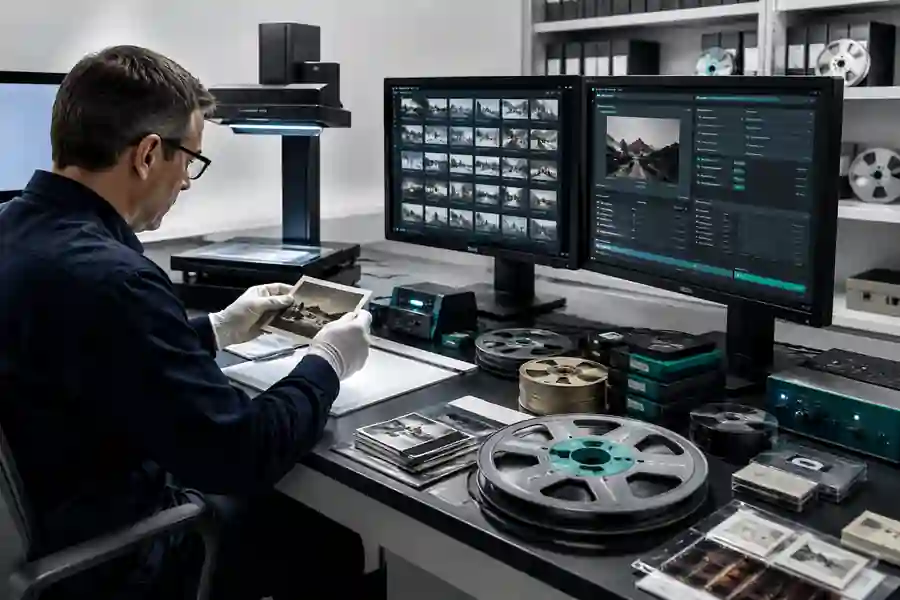
Every digital archiving project starts with knowing what you have. COMTASK helps organizations assess their audio-video collection, identify media types, estimate volume, review physical condition, and classify materials by importance.
This creates a clear starting point. It also helps prioritize urgent materials that may be at risk of damage or loss.
2. Audio-Video Digitization
COMTASK supports digitization planning for audio and video materials. This may include tapes, cassettes, CDs, DVDs, broadcast recordings, event recordings, interviews, lectures, and digital files stored across different devices.
The goal is to convert media into usable digital formats while maintaining quality, consistency, and long-term accessibility.
3. Metadata Design and Cataloguing
Metadata is the foundation of a useful archive. It tells users what each item is, when it was created, who appears in it, what topics it covers, where it belongs, and how it can be used.
COMTASK designs metadata fields that fit the organization’s needs. These may include title, date, speaker, location, program name, subject, language, rights status, duration, format, keywords, department, and access level.
4. Searchable Archive Platform
A digital archive should not be just a folder system. It should allow users to search, filter, preview, retrieve, and manage media assets easily.
COMTASK helps organizations build or configure archive platforms that allow authorized users to search by title, date, topic, speaker, media type, department, project, or keyword.
5. Access Control and User Permissions
Not every archive item should be open to every user. Some materials may be public. Others may be internal, confidential, copyrighted, sensitive, or restricted.
A strong digital archiving solution includes user roles, permission levels, approval workflows, and access controls. This protects the organization while keeping useful materials available to the right people.
6. Backup, Storage, and Preservation Planning
Digital archiving is not complete after files are uploaded. Long-term preservation requires structured storage, backup planning, file integrity checks, format management, and clear responsibility.
COMTASK helps organizations design practical storage and backup structures to reduce the risk of data loss, corruption, or unauthorized access.
7. AI-Assisted Discovery and Transcription
Modern digital archives can use AI to improve search and discovery. AI tools can support speech-to-text transcription, automatic tagging, topic detection, summarization, translation support, and content classification.
For audio-video archives, this is especially useful. Users can search inside spoken content instead of relying only on manual titles or descriptions.
Our Digital Archiving Process
COMTASK follows a structured process for digital archiving projects.
Phase 1: Archive Assessment
We review the collection size, media types, condition, storage location, current documentation, risks, and organizational needs.
Phase 2: Archive Strategy
We define the archive goals, user groups, access rules, digitization priorities, metadata structure, storage plan, and implementation roadmap.
Phase 3: Digitization Planning
We plan how audio-video materials will be converted, named, quality-checked, stored, and linked to metadata records.
Phase 4: Metadata and Cataloguing
We create a structured cataloguing system that makes each item easier to search, manage, and preserve.
Phase 5: Platform Setup
We help implement or configure a digital archive platform that supports search, access control, file management, reporting, and long-term use.
Phase 6: Quality Control
We review file quality, metadata consistency, duplication, naming structure, playback access, and user permissions.
Phase 7: Training and Handover
We train the organization’s team to manage the archive, add new materials, search the system, control access, and maintain the archive over time.
Metadata and Searchability
A good digital archiving solution depends on strong metadata. Without metadata, a digital archive becomes a storage system, not a knowledge system.
For audio-video items, useful metadata may include:
- Title
- Description
- Speaker or participant name
- Program or event name
- Recording date
- Location
- Language
- Duration
- Media type
- Original format
- Digital format
- Keywords
- Rights owner
- Copyright status
- Access level
- Department or project
- Transcript availability
This structure allows users to find items quickly and reduces dependence on individual memory.
Digital Preservation and Security
Preservation means keeping files usable over time. It is different from simple storage.
COMTASK helps organizations think beyond upload and storage. We support practical preservation planning, including:
- Standard file naming rules.
- Master files and access copies.
- Backup copies in separate locations.
- Version control.
- Access permissions.
- File format planning.
- Archive governance roles.
- Regular review and maintenance.
This protects media assets from accidental deletion, poor organization, unauthorized use, and technical failure.
Who Needs This Solution?
COMTASK’s digital archiving solution is suitable for organizations that manage large or valuable audio-video collections, including:
- Government entities.
- Media organizations.
- Radio and television archives.
- Universities and research centers.
- Cultural institutions.
- Museums and heritage organizations.
- Corporate communication departments.
- Training and learning departments.
- Event organizations.
- Non-profit organizations.
Expected Outcomes
A well-designed digital archiving solution can help organizations achieve clear outcomes:
- Preserved audio-video materials.
- Reduced risk of media loss or damage.
- Searchable and structured media collections.
- Improved access for authorized users.
- Better content reuse for communication, education, and research.
- Clearer ownership and rights tracking.
- Improved institutional memory.
- More efficient archive management.
- Better readiness for future AI-powered search and discovery.
Why Choose COMTASK?
COMTASK brings practical experience in digital transformation, IT solutions, project management, and media archiving. Our experience includes strategic work related to large-scale audio archives and digital preservation initiatives.
We understand that audio-video archiving is not only a technical project. It is also a governance, metadata, preservation, access, and change management project.
COMTASK can support your organization through assessment, planning, platform selection, metadata design, digitization workflow, archive governance, user training, and long-term improvement.
Related COMTASK Services
- IT Solutions and Consulting
- Digital Transformation Consultancy
- Project Management
- Management Consultancy
- Contact COMTASK
Start Your Digital Archiving Project
If your organization has valuable audio-video collections, COMTASK can help you protect them, organize them, and make them easier to use.
Contact COMTASK today or email info@comtask.net to discuss your digital archiving solution.